
In case you havent heard of it yet, as3swf is an ActionScript 3 library to parse and publish SWF files. It does that rather well by now, providing full roundtrip publishing, plus some neat extra features like shape export to AS3 Drawing API, AS3 GraphicsObjects, FXG, and Objective-C.
Whenever i find some free time i’m working on adding new, useful features. One feature of as3swf, that i haven’t talked about much yet but is implemented for quite a while already, is the reconstruction of timelines as you know them from Adobe’s Flash IDEs.
In the first place, timelines in as3swf help you to export and render layered animations. Having a long list of parsed SWF tags won’t help much if you want to export or render frame X, as the Flash Player would display it.
Flash Player Display List
When executing a SWF, the Flash Player reads sequentially through all its tags, from start to end, and builds and maintains an internal display list along the way. This display list is manipulated by PlaceObject and RemoveObject tags, and rendered every time the Flash Player encounters a ShowFrame tag. Characters placed on the display list by PlaceObject tags stay on the display list until they are removed by a RemoveObject tag. PlaceObject tags are also used to manipulate a previously placed character (tweens).
In order to figure out which characters are displayed how and at which depths in any given frame, as3swf simulates the Flash Player behavior and builds its own display list structures while parsing the tags.
as3swf’s SWF (root) and TagDefineSprite (movieclips) classes each have a timeline property, containing an instance of the SWFTimeline class. Other than the tags itself, this class contains the following goodies:
dictionary– Contains references to all characters that may be placed on the display list. The dictionary’s key is the character ID as defined by the definition tag, the value is the index of the definition tag.scenes– Lists all scenes with their names and frame numbers.frames– Lists all frames. For each frame, you can access the contained characters and their depths, what tag placed the character on the display list, what tag modified its transformation/color matrices if any (for tweens) and whether this frame is a key frame or not.layers– Lists all layers. Each layer contains an array of active frames.soundStream– If present, contains this timeline’s sound stream complete with raw MP3 data, start frame, length, number of samples etc.
Example
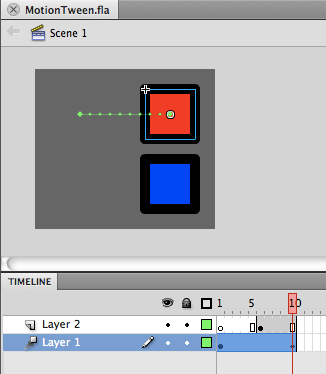
Consider the following very simple FLA. It has two layers, one containing a motion tween, the other a static on-stage shape starting at frame 5:
Published to SWF:
[SWF]http://wahlers.com.br/claus/blog/wp-content/uploads/MotionTween.swf, 180, 160[/SWF]
Parsed by as3swf, we get these timeline infos (get the full trace dump here):
  Scenes:
    Name: Scene 1, Frame: 0
  Frames:
    [0] Start: 0, Length: 9
      Depth: 1 (Layer 0), CharacterId: 2, PlacedAt: 5, IsKeyframe
    [1] Start: 9, Length: 2
      Depth: 1 (Layer 0), CharacterId: 2, PlacedAt: 5, LastModifiedAt: 9
    [2] Start: 11, Length: 2
      Depth: 1 (Layer 0), CharacterId: 2, PlacedAt: 5, LastModifiedAt: 11
    [3] Start: 13, Length: 2
      Depth: 1 (Layer 0), CharacterId: 2, PlacedAt: 5, LastModifiedAt: 13
    [4] Start: 15, Length: 2
      Depth: 1 (Layer 0), CharacterId: 2, PlacedAt: 5, LastModifiedAt: 15
    [5] Start: 17, Length: 4
      Depth: 1 (Layer 0), CharacterId: 2, PlacedAt: 5, LastModifiedAt: 17
      Depth: 3 (Layer 1), CharacterId: 3, PlacedAt: 19, IsKeyframe
    [6] Start: 21, Length: 2
      Depth: 1 (Layer 0), CharacterId: 2, PlacedAt: 5, LastModifiedAt: 21
      Depth: 3 (Layer 1), CharacterId: 3, PlacedAt: 19
    [7] Start: 23, Length: 2
      Depth: 1 (Layer 0), CharacterId: 2, PlacedAt: 5, LastModifiedAt: 23
      Depth: 3 (Layer 1), CharacterId: 3, PlacedAt: 19
    [8] Start: 25, Length: 2
      Depth: 1 (Layer 0), CharacterId: 2, PlacedAt: 5, LastModifiedAt: 25
      Depth: 3 (Layer 1), CharacterId: 3, PlacedAt: 19
    [9] Start: 27, Length: 2
      Depth: 1 (Layer 0), CharacterId: 2, PlacedAt: 5, LastModifiedAt: 27
      Depth: 3 (Layer 1), CharacterId: 3, PlacedAt: 19
  Layers:
    [0] Frames 0, 1, 2, 3, 4, 5, 6, 7, 8, 9
    [1] Frames 5, 6, 7, 8, 9
Lets take a closer look at frame 6:
  [5] Start: 17, Length: 4
    Depth: 1 (Layer 0), CharacterId: 2, PlacedAt: 5, LastModifiedAt: 17
    Depth: 3 (Layer 1), CharacterId: 3, PlacedAt: 19, IsKeyframe
This tells us that this frame:
- displays character ID 2 (the red square movieclip) at depth 1. This character was originally placed on the display list by tag index 5 and was modified by tag index 17 (this character is tweened).
- displays character ID 3 (the blue square shape) at depth 3. This character was placed on the display list by tag index 19. As the character was placed in this very frame, this is a key frame.
- starts at tag index 17 and consumes 4 tags total:
17: [26:PlaceObject2] Depth: 1, Matrix: (1,1,0,0,1400,400)
18: [83:DefineShape4] ID: 3, EdgeBounds: (2200,3200,1800,2800)
      FillStyles:
        [1] [SWFFillStyle] Type: 0 (solid), Color: FF0000FF
      LineStyles:
        [1] [SWFLineStyle2] Width: 200, Color: FF000000
      ShapeRecords:
        [SWFShapeRecordStyleChange] MoveTo: 3200,1800, FillStyle1: 1, LineStyle: 1
        [SWFShapeRecordStraightEdge] Vertical: 1000
        [SWFShapeRecordStraightEdge] Horizontal: -1000
        [SWFShapeRecordStraightEdge] Vertical: -1000
        [SWFShapeRecordStraightEdge] Horizontal: 1000
        [SWFShapeRecordEnd]
19: [26:PlaceObject2] Depth: 3, CharacterID: 3, Matrix: (1,1,0,0,0,0)
20: [01:ShowFrame]
As you can see, this info is a quite exact reconstruction of the original FLA’s timeline, and can be used to rebuild the original FLA (XFL, rather), to publish SWFs to run natively on alternative runtimes and platforms (HTML5, iPhone OS), or as a very first step to creating a web based version of the Flash IDE.
Happy hacking!
This is so great!
In the past few weeks I analysed a lot how flash IDE is managing timeline animation.
This will help me a lot continue thoses research.
With this information you can predict memory usage and do datamining in batch process of a list of assets. This is huge.
Thanks Claus!
I just started using your library for the iphone and I’d like to contribute to it. I use Flash CS4 (exporting for adobe air 1.5), and iphone simulator 3.0. It looks like the Objective-C example has some typos/bugs (http://wiki.github.com/claus/as3swf/shape-export-to-objective-c):
line 37: Instead of defineShape.shapeId should be :defineShape.characterId
line 48: docHandler is not a global variable.
I fixed the above compiler issues, and wrote a test Objective C program for the iphone, but the colors of the swf I have are not shown. Do you know what is going wrong?
Thanks!
Fotios, thanks for pointing that out. Apparently i made some changes to the API after writing that article and didn’t find the time yet to get back to testing and updating the Obj-C exporter stuff, sorry about that. I’m gonna fix it the coming weekend, latest.
Claus, not a problem. Like I said, I’m working on translating some flash files into Objective C graphics-code for the iphone and your library has been extremely useful.
Also, I found out that some swf’s I’m converting don’t include the “TagDefineShape” tag, so the code breaks. Please let me know if I can help in any way to improve the library. It looks like I have to adapt the Objective-C conversion code for my needs. THANKS so much for your quick reply!
I’m so glad you’re still looking into this Claus.
Hi Master,
Could you please add a example how to create a swf file with some timeline animation from scratch using as3swf API , this will be so great to start a web based Flash IDE
Hi,
I’m not a flash/flex developer, so I might be missing a few things. I managed to download and install flash builder and create a small program to export an SWF file to obj-c files. So far so good.
The SWF file was an export from a Adobe Illustrator image. It contained 3 symbols: a square, a circle and a star. The SWF looked exactly like the AI. I got 3 UIView classes. I used these inside a test ios app and got to display the shapes. First a single shape, then the 3 shapes. Still: so far so good…
But there was a small issue: the 3 different shapes are all in the corner instead of the position they were originally placed. In some way it makes sense, but it’s a bit annoying.
I wonder if there is a way to get the original “offsets” from the swf using your library.
Or am I doing something wrong in the export that I end up with 3 different symbols anyway.
Thanks for the advice and for the great tool!
PS: I modified the script in the Objective-C page with fixes I did to make it work.
Hi Jeroen,
to get the offsets (or, to be exact, the transformation matrix – characters can be positioned, rotated and scaled), you have to scan the SWF for PlaceObject tags, which contain this info. The DefineShape tags, which have the export functionality built in, only contain the raw shape, without any info on where that particular shape is actually placed on the display list.
If you have a very simple SWF, that only contains one frame with three shapes, it is sufficient to just scan for PlaceObject tags, check for the characterId, and grab the matrix.
This is, simplified, the structure you would find:
DefineShape id 1
DefineShape id 2
DefineShape id 3
PlaceObject characterId 1, depth 1, matrix
PlaceObject characterId 2, depth 2, matrix
PlaceObject characterId 3, depth 3, matrix
However, SWF can get very complex, shapes and other assets can be placed multiple times, and there are tweens, nested movieclips etc etc, so there’s a lot more to consider.
HTH,
Claus.
PS: Thanks for the Wiki edit!